For years, a capable chat in the browser was the fastest way to put domain-tuned models in front of security teams. That foundation let us ship quickly, gather feedback, and prove what “security-first” AI could do when refusals and hand-waving weren’t the default answer.
What is an integrated hacking environment?
Hacker Sidekick is an integrated hacking environment: a full desktop application (not a browser client or an editor plugin) where cybersecurity work-not generic office tasks-is the point of the product. It is where sovereign, security-tuned AI, agentic workflows, access to your filesystem and local tools, and your machine context come together so analysis and execution stay connected.
“Integrated” means you are not constantly context-switching between a browser tab, a half-dozen terminals, and a pile of manual copy-paste. The environment is meant to orchestrate multi-step, tool-using workflows-often called agentic-so the assistant can plan, invoke capabilities, and carry state across steps instead of forgetting everything after each reply.
“Hacking” here is deliberate: we mean legitimate offensive and defensive security work-pentesting, research, triage, malware analysis, purple-team exercises-where refusals and generic guardrails get in the way. Hacker Sidekick is built for operators who need models and automation aligned with that reality, on your hardware and under your controls.
In short: an integrated hacking environment is not “chat in a window.” It is the shell we’re building so Hacker Sidekick can meet security teams where their tools, data, and execution actually live.
But legitimate offensive and defensive work does not happen entirely inside a tab. It happens next to terminals, disk, logs, pcaps, IDEs, and the same binaries and scripts your operators already trust. A browser-first product can describe those worlds; desktop-native Hacker Sidekick can meet them where they live.
Why we’re moving the core experience to the desktop
Hacker Sidekick is our answer to three hard limits of “chat-only in Chrome”:
- Reach: Security workflows need repeatable access to local tools-scanners, disassemblers, interpreters, CLIs on
PATH, WSL, lab VMs-not just descriptions of what you might run somewhere else. - Ground truth: Analysis turns into outcomes when the model can work with your files and artifacts under your controls, instead of pasting fragments into a text box.
- Agentic depth: Multi-step, tool-using “agentic” behavior needs a stable host process and clear boundaries-something a dedicated desktop shell is better positioned to provide than a generic web session alone.
The public web experience is going away
Let’s be direct: the standalone Hacker Sidekick web application-the browser chat you open as the product-is being retired. We are not maintaining a parallel “primary” web client alongside the desktop app. If your mental model was “log in and chat in a tab,” that path is ending in favor of one depth-first experience: Hacker Sidekick as an integrated hacking environment on the desktop.
That is a deliberate product decision. The browser was the right place to start; it is not the right place to finish for the kind of execution-heavy, tool-connected, file-grounded work we are building toward. Sunsetting the public web surface lets us align engineering, security boundaries, and the roadmap on Hacker Sidekick without splitting attention across two full clients forever.
What you get in Hacker Sidekick
In practical terms, Hacker Sidekick is built to combine sovereign, security-tuned models with an execution surface that matches how your teams already operate:
- Agentic workflows that can plan, invoke tools, and carry context across steps-not one-shot replies.
- Access to local tools and environments so analysis and automation align with your stack, not a vendor’s sandbox.
- Files and resources on your machine as first-class inputs-logs, exports, configs, captures-without treating the host as an afterthought.
Same mission. Hacker Sidekick remains focused on legitimate security work-with models and workflows tuned for the tasks that generic assistants were never designed to support.
See it on the desktop
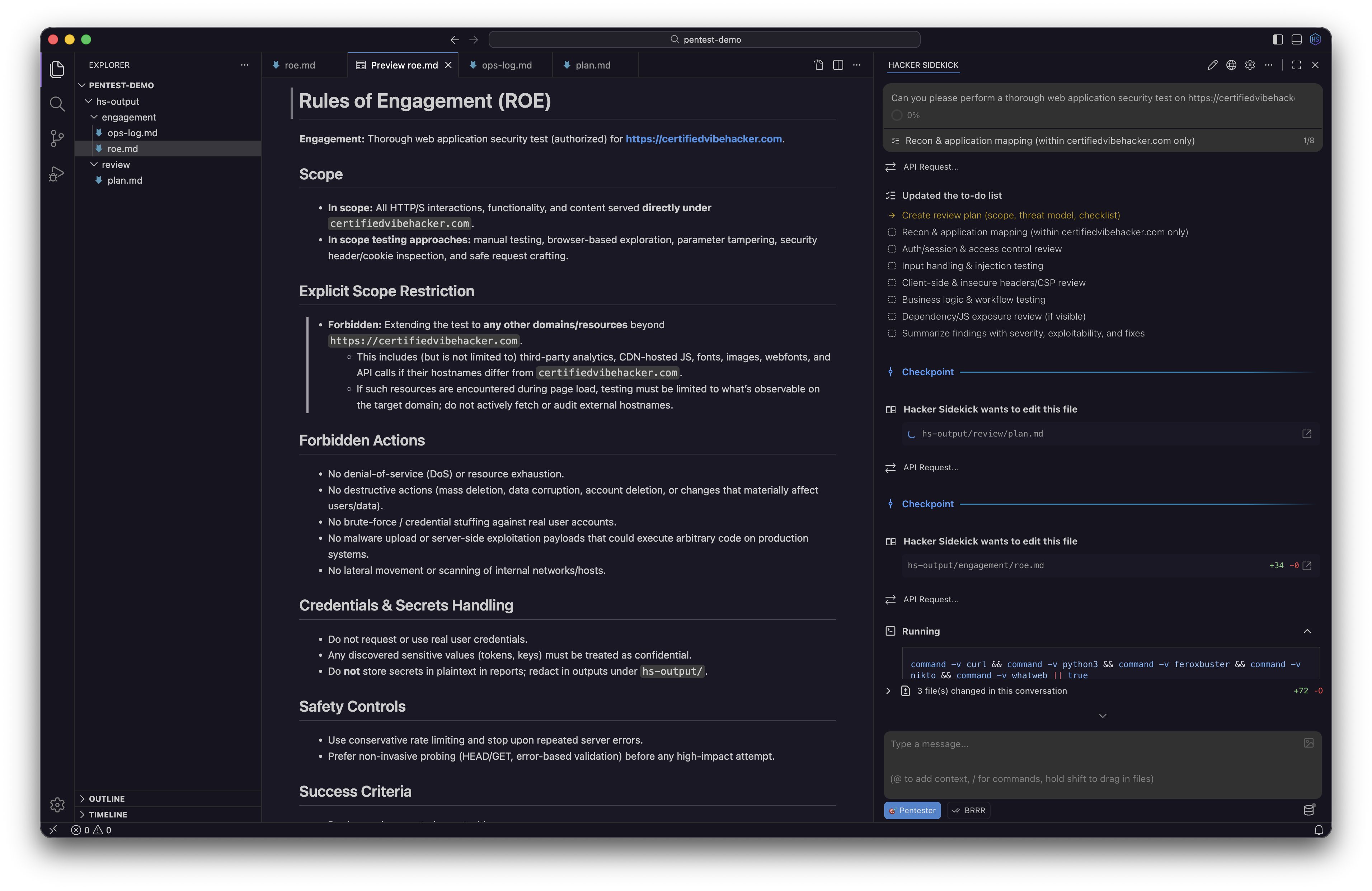
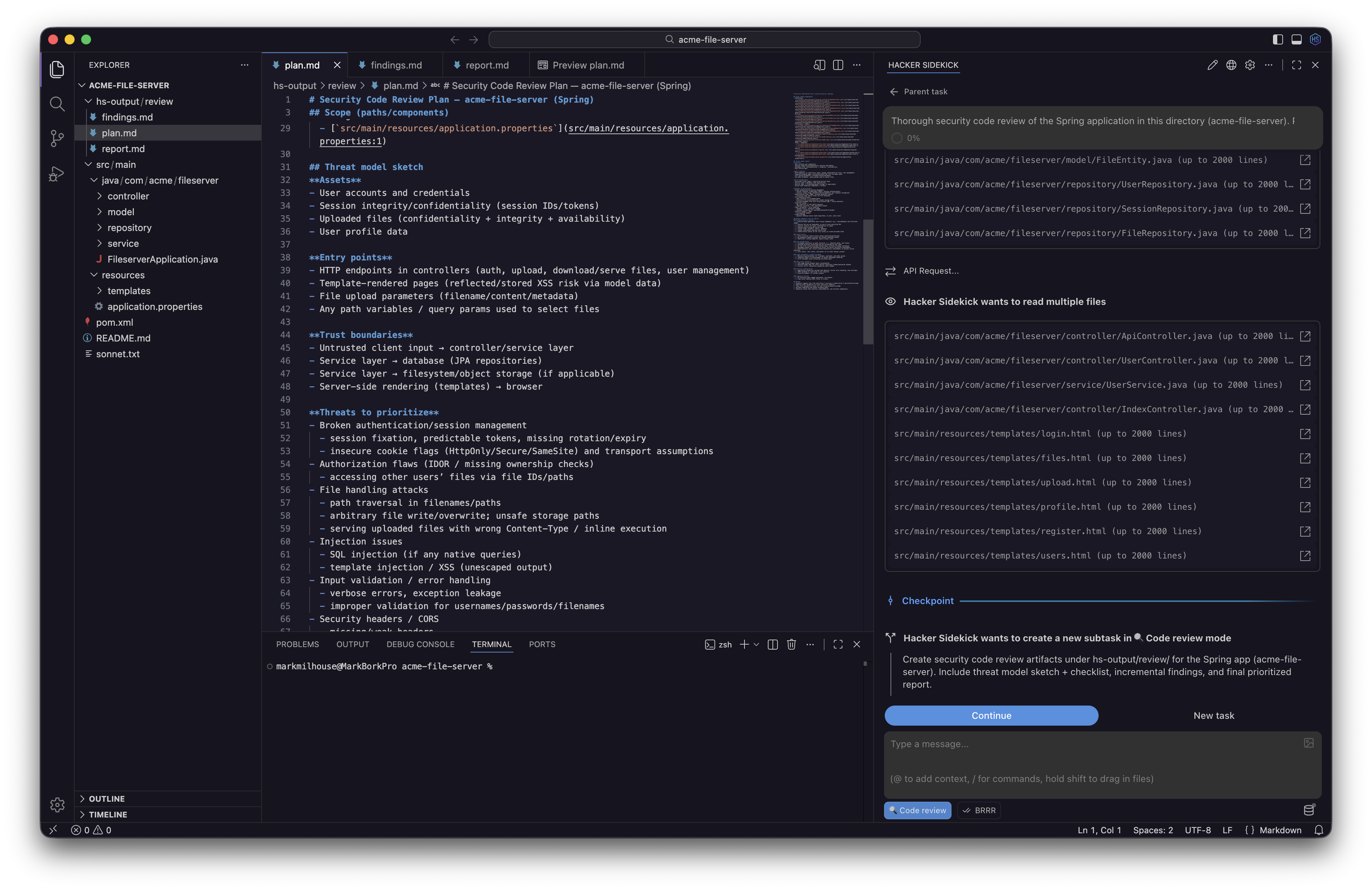
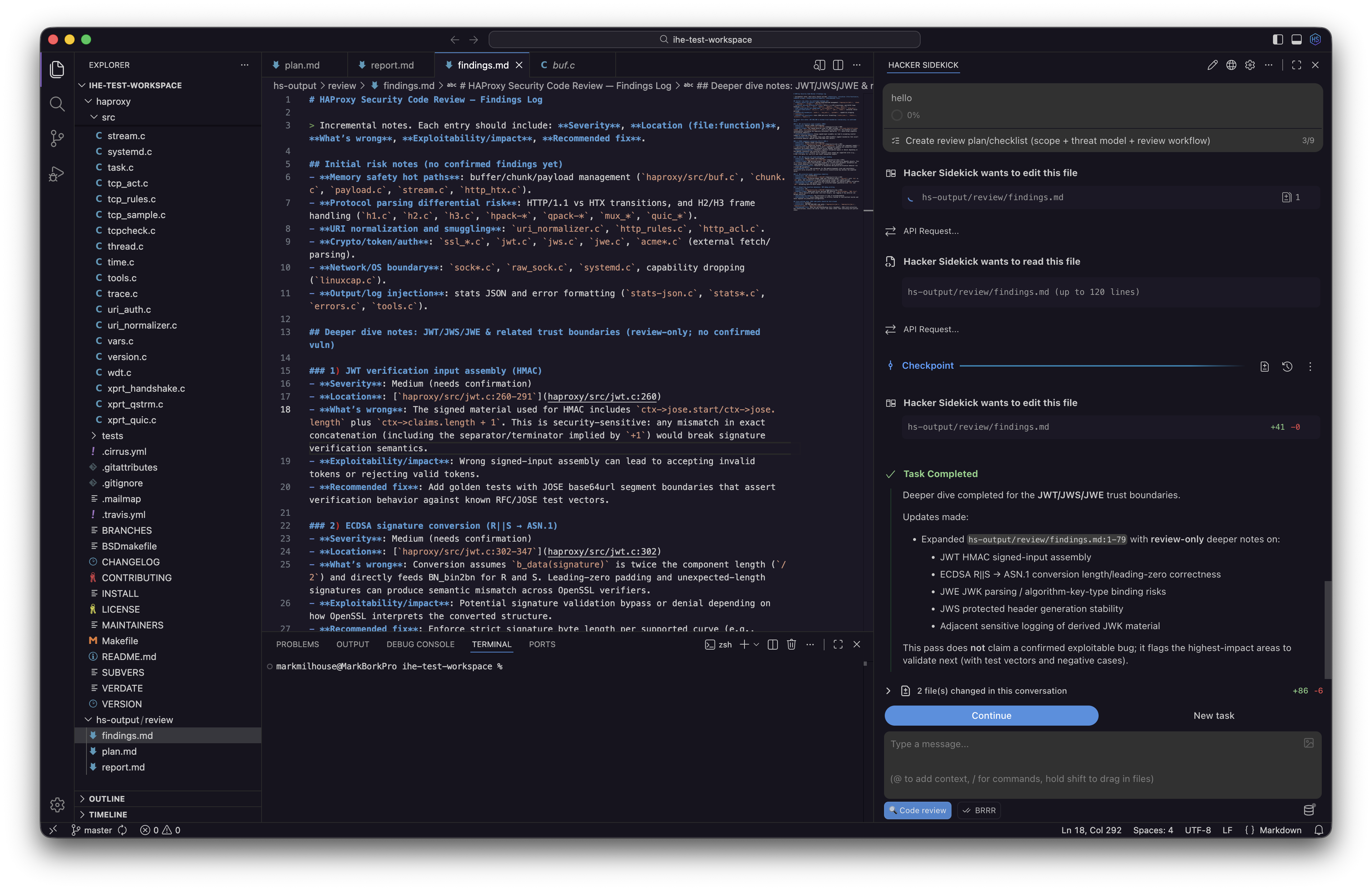
The desktop app (not a browser client): agentic AI with filesystem access and local tooling-plan pentests, run structured code reviews, and keep findings with your project files.
Enterprises: your web tier stays-and becomes the fusion backend
If that sounds like we’re “turning off the web” for everyone, it isn’t quite that simple for enterprise customers. For organizations that run Hacker Sidekick against existing web infrastructure, those deployments are not going away. Your web servers, web chat where you already use it, and a rapidly growing catalog of integrations remain a core part of how Hacker Sidekick connects to your data, policies, and toolchain.
What changes is the role of that tier: it becomes the backend fusion platform for Hacker Sidekick. Instead of two competing “products,” you get one Hacker Sidekick platform-the web layer aggregates connectors, identity, governance, and organizational context; the desktop app is the agentic application that sits on the operator’s machine, pulls that picture together with local tools and files, and acts with depth the browser alone could not sustain.
In practice, that means your enterprise can keep pulling institutional knowledge into one coherent view-tickets, intel feeds, internal APIs, custom integrations-while the desktop agent uses that fused backend to empower cybersecurity operators further than a tab-bound chat ever could: longer runs, richer tool use, and execution where the work actually happens.
What this means for you
Individual operators and teams on the public product: move to Hacker Sidekick on the desktop. Download the app for your platform, sign in with your Hacker Sidekick account, and treat the desktop environment as the product-we’re concentrating roadmap, features, and agentic capability there.
Enterprise customers: coordinate with your account team on how your existing web deployment maps to the desktop rollout; your web surface continues as the integration and fusion backbone while operators adopt the desktop application as the primary workspace.
Ready to get started?
Windows, macOS (Apple silicon and Intel), and Linux (.deb) builds are available from the homepage.
We’ll keep sharing what ships in Hacker Sidekick, how agentic workflows evolve on the desktop, and how enterprise fusion and private deployment options come together on one platform.
- The Hacker Sidekick Team