Where we started
If you've been following Hacker Sidekick for a while, you know us as a web application. That's how we launched: a browser-based chat platform built on Open WebUI where security professionals could work with AI models tuned for cybersecurity.
That web platform is still here. But its role is changing, and we want to explain what's happening and why.
Two things happened at the same time
First, as we wrote about in our last post, practitioners at conferences and workshops kept telling us they wanted an AI that could actually execute: connect to local tools, run agentic workflows, and operate the way security professionals actually work. That's what led us to build the desktop application we just launched.
Second, enterprise security teams started reaching out. The ask was consistent. They wanted on-premises compute. On-premises inference. Single tenancy. Or some combination of all three. These teams handle sensitive data, operate under strict compliance requirements, and need to know exactly where their queries and results live. Sending security work to a shared cloud wasn't going to work for them.
So we built for both. And in the process, the relationship between the web platform and the desktop app became clear: they aren't competing products. They serve different roles in the same architecture.
The desktop app: where security work happens
The desktop application is new, and it's now the primary way most people will use Hacker Sidekick. You download it, authenticate, and start working with your own tools on your own machine.
It connects directly to your local toolchain: scanners, disassemblers, CLIs, virtual environments, whatever you already use. It runs agentic workflows that chain together reconnaissance, analysis, and reporting without you having to copy-paste between windows. Everything stays local and under your control.
If you're an independent researcher, a consultant, a bug bounty hunter, or part of a small team, this is your starting point, and for many practitioners it's all you need.
The enterprise server: the organizational backbone
For organizations that need centralized control, the web platform we originally built is evolving into something more focused. We're calling it the fusion server.
Rather than being a standalone interface where operators do their day-to-day work, the enterprise server is becoming the backbone behind the desktop experience. It's the central layer where an organization's models, knowledge, connectors, and policies come together and feed into the desktop app as a unified platform.
Today, the enterprise server is a full self-hosted platform: chat, model routing, RAG, tools, knowledge bases, enterprise authentication, admin controls, and integrations. It can be deployed in just about any configuration an organization needs. Fully on-prem with local inference, hybrid setups, or single-tenant cloud with dedicated infrastructure. The flexibility matters because every organization's security posture and compliance landscape is different.
So what does "fusion" mean?
The word is intentional. The fusion server fuses together everything an organization needs to centralize, and delivers it into the desktop experience as a single coherent layer.
That means identity governance, so the right people have the right access. Connector management, so integrations with your SIEM, ticketing system, threat intel feeds, and other platforms are configured once and available to every operator. Organizational knowledge bases, so institutional knowledge like playbooks, prior findings, and internal documentation is accessible across the team. And policy and guardrails, so usage stays within the boundaries your organization sets.
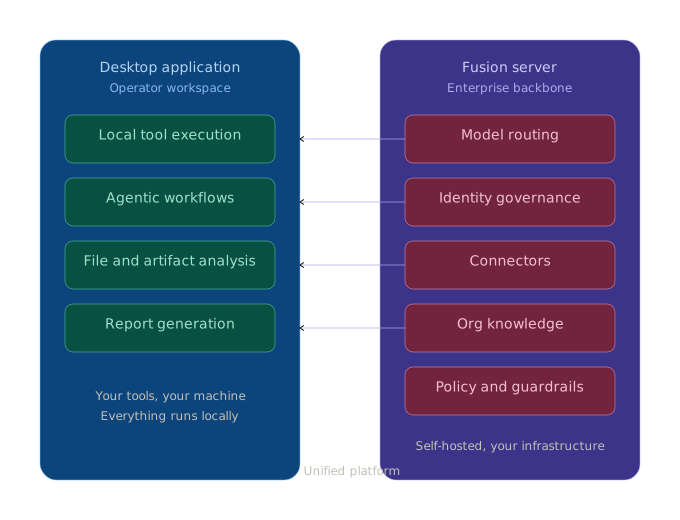
The desktop is the operator's workbench. The fusion server is the system of record and integration plane for everything that should not live only on a single laptop. Not a second product, but the backbone the desktop relies on.
Which path is right for you?
Download the desktop app if you are an individual practitioner, consultant, or small team. You want to get started quickly with your own tools on your own machine. You don't need centralized administration or org-wide integrations.
Talk to us about an enterprise deployment if you have a team of operators who need shared access to organizational knowledge. You need centralized identity management and usage governance. You want to integrate Hacker Sidekick with your existing security infrastructure (SIEM, SOAR, ticketing, threat intel). You have compliance or data residency requirements that demand self-hosted infrastructure.
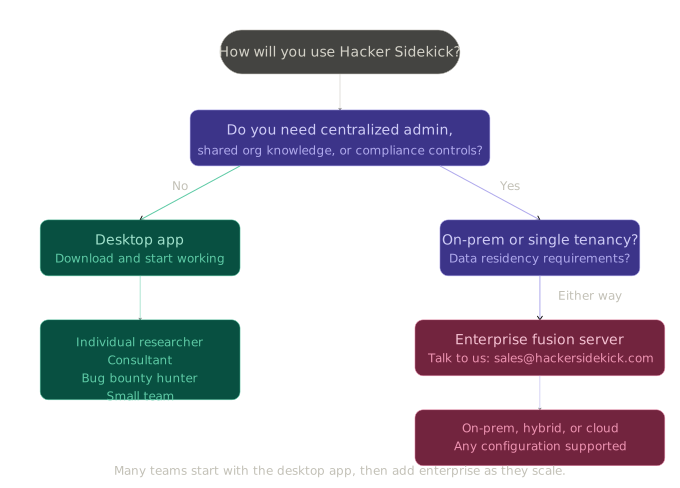
Many organizations will start with a few operators using the desktop app individually, then move to an enterprise deployment as they see the value and want to scale it across their team. That's a path we've designed for, and we're happy to help you navigate it.
Where this is going
We're building toward an architecture where the desktop application is the primary surface for all security work, and the fusion server is the system of record behind it, feeding identity, connectors, organizational knowledge, and guardrails into the desktop as a unified platform rather than a collection of disconnected tools.
Try it
If you're ready to get started, download the desktop app and see what it can do with your existing toolchain.
If you're evaluating for a team or organization and want to talk about enterprise deployment, reach out at [email protected] or schedule a demo.
We'll be back later this week with our first case study: a full web application penetration test, start to finish, inside the Hacker Sidekick desktop environment.
— The team at Hacker Sidekick